
Best AI for Studying in 2026: Top Tools for Students
 SubShave Editorial21 October 2026
Find AI study tools for explanations, lecture notes, quizzes and revision. Compare free options, student eligibility and ways to check AI answers.
The best AI for studying depends on what you need help with. Use a general assistant to explore a difficult concept, a source-based tool to revisit course material, and a flashcard system to practise recalling it. You do not need a paid subscription for every role.
This is an editorial shortlist by task, based on documented capabilities. It is not a controlled ranking of learning outcomes, and none of these tools guarantees correct answers or better grades.
AI study tools compared by task
| Study task | Tools to consider | What to check |
|---|---|---|
| Explain an unfamiliar concept | ChatGPT, Claude or Gemini | Accuracy against your course materials |
| Revise from readings and lecture notes | NotebookLM / Gemini Notebook | Source citations and missing coverage |
| Practise recall | Anki or a quiz/flashcard tool | Accuracy of cards and device costs |
| Organize a semester | Notion or your existing notes app | Education eligibility and AI limits |
| Find research starting points | A search assistant or library search | Read and verify original sources |
Start with one general assistant
Try the same small set of tasks in the free access available to you: explain a concept, critique your attempted solution and ask a practice question. Pick the tool whose explanations you can check and understand.
Give it the syllabus level and the notation your course uses. Ask for one step at a time, and stop when a claim conflicts with your textbook or instructor's explanation. A confident answer is not evidence that the answer is correct.
Compare our ChatGPT plan guide, Claude pricing guide and Google AI plan guide only if a recurring limit or particular feature makes paid access relevant. Check what your school already provides first.
NotebookLM and Gemini Notebook: use your sources
Google's current help documentation uses the name Gemini Notebook for the source-based research tool associated with NotebookLM. It supports uploaded or discovered sources, cited answers and study formats such as guides, audio overviews, flashcards and quizzes.
That makes it a useful candidate for revision from a defined reading list. It does not eliminate errors or guarantee complete syllabus coverage. Check the cited passage, confirm that your uploaded material includes the topic and ask the tool to identify uncertainty.
Use one notebook per course or coherent topic. Include a syllabus or learning-objective list so you can compare what should be covered with what your notes actually contain. Do not upload restricted course material or other people's personal information without the required permission.
Anki and flashcards: verify before drilling
An assistant can draft question-and-answer pairs, but review every card before adding it to your study deck. A repeated incorrect answer is a bad study habit, however polished the card looks.
Anki's official site provides a free desktop version and free web synchronization. AnkiDroid is free on Android; the official AnkiMobile iOS app is paid. Do not assume every application with a similar name is the same product.
Keep cards focused. Instead of a paragraph asking for five unrelated facts, use a small question with a clear answer. Add a source note so you can resolve disagreements later.
Notion for students: organization and AI are separate
Eligible students and educators at recognized higher-education institutions can get Notion's free individual Education Plan for a one-member workspace. A qualifying institutional email and annual verification are required under the checked rules.
That offer should not be described as unlimited free Notion AI. The pricing comparison lists limited AI trials on Free and Plus; review your workspace's actual entitlement. Use the Notion AI pricing guide if AI features are the reason you are considering an upgrade.
A simple one-week study workflow
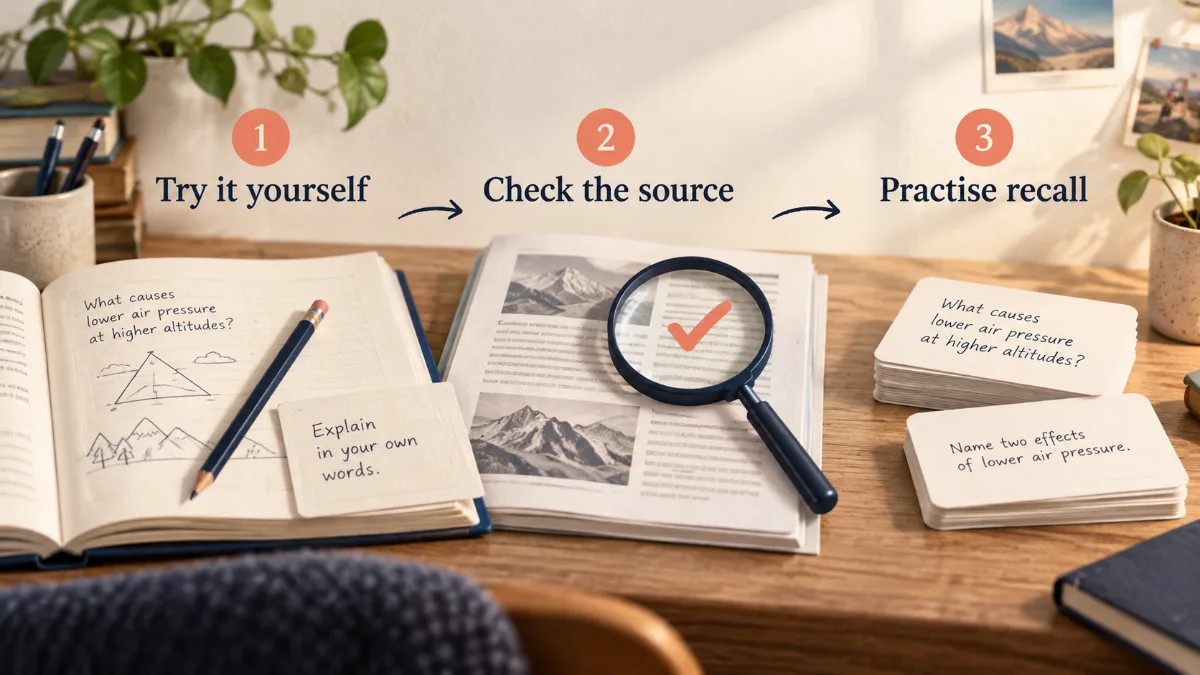
- Choose one topic. Write down what you need to understand and the course source that covers it.
- Attempt it yourself. Explain the concept or solve the problem before requesting help.
- Ask for feedback. Supply your attempt and ask the assistant to identify a gap without giving away the entire solution.
- Verify the feedback. Compare it with the reading, worked example or instructor guidance.
- Practise again later. Answer from memory and use the result to decide what to revisit.
Keep a short record of topics you can explain without assistance. That is a more useful signal than the number of summaries generated.
Prompts you can adapt
For understanding: “I understand [starting point], but I am confused about [concept]. Explain one step at a time, give a simple example, then ask me a question to check my understanding.”
For revision: “Use these course notes to ask one question at a time. Wait for my answer. Explain the correction with a reference to the notes, and say when the notes do not establish the answer.”
For written work: “Review my argument against this rubric. Identify unclear reasoning and unsupported claims. Do not rewrite the assignment for me.”
When is paying worth it?
Consider a paid month only when you can name the limitation that repeatedly interrupts study. Record how often it happens, what the upgrade changes and whether an institution-provided tool already solves it. Review before renewal.
Check student subscription discounts without assuming a previous semester's promotion is still running. If money is tight, spend time improving your study process before adding several overlapping subscriptions.
Academic rules and accuracy
Follow the rules for each course and assignment. Some instructors permit certain assistance with disclosure; others restrict it. Ask when the policy is unclear. Even practice use must respect any restrictions on uploading materials or using AI.
Read original research sources before citing them. Verify calculations independently and do not submit an invented reference because an assistant presents it confidently.
Frequently asked questions
What is the best free AI for studying?
There is no single winner for every subject. Start with one available assistant and compare its help on your actual coursework; add a source-based tool or flashcards only when needed.
Can AI replace learning the material?
It can help explain and test, but you still need to produce and check your own reasoning. Being able to recognize an answer is different from recalling it unaided.
Do students need paid Notion AI?
No. A notes and deadline system can be useful without AI. Check education eligibility separately from the AI entitlement.
Sources and price checks
Editorial check: 27 September 2026. Prices and terms are a dated snapshot, not a promise of a future offer. Confirm your country, selected plan, taxes and renewal at checkout.
Save Money Today
Compare current offers for this service
SubShave compares third-party offers for streaming, AI tools, and software. Check the seller’s current prices and terms before purchasing.
Related Articles
AI Tools
Compare ElevenLabs plans, monthly credits and annual costs. Understand rollover, commercial use and the real cost of retries before choosing a plan.

Compare Runway AI Free, Standard, Pro and Max pricing, annual costs and credits. Learn how retries, rollover and API billing affect your budget.

Compare Midjourney pricing, annual savings, Fast GPU hours, Relax Mode, Stealth Mode, and the real cost for different creative workloads.
Popular on SubShave
Save Money Today
Pay Less for the Subscriptions You Keep
Compare subscription offers for streaming, AI tools, and software. Prices, access arrangements, and availability vary by seller.
Explore All Deals