
Best Streaming Deals in 2026: Discounts, Bundles, and Offers
 SubShave Editorial1 September 2026
Compare the best streaming deals through rotation, annual plans, bundles, trials, prepaid membership and clearly labelled shared access.
Affiliate disclosure: This article contains affiliate links. SubShave may earn a commission if you purchase through them. SubShave publishes comparisons; the provider or seller identified at checkout handles your purchase.
The best streaming deals in 2026 are not necessarily the plans with the lowest advertised price. A good deal combines a service you actually want with a billing structure that matches how long you expect to use it. Annual plans, bundles, prepaid memberships and carefully chosen shared access can all reduce cost, but they come with different commitment, ownership, renewal and feature rules.
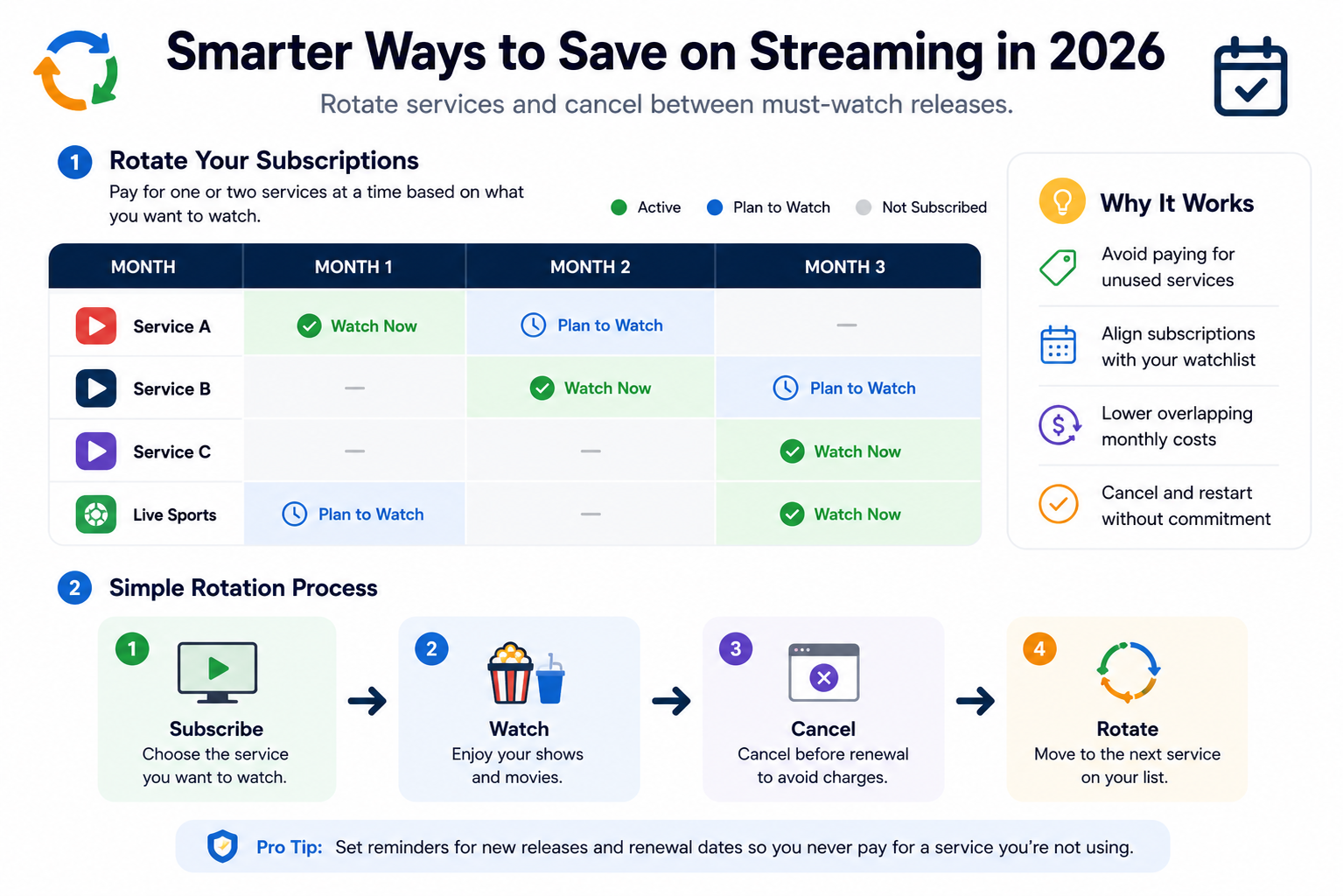
For many households, the most effective strategy is rotation rather than permanent stacking. Keep one or two services that are used regularly, add another for a particular series or sports period, and cancel it when the planned viewing is finished.
Best streaming deals: quick comparison
These are US price references. Check the provider links and your local checkout for tax, current offers and renewal. Plans and bundle eligibility can differ in other countries.
| Service or route | Current US starting point | Deal method | Best for |
|---|---|---|---|
| Paramount+ Essential | $8.99/month; check annual quote | Monthly or annual | Confirm the catalogue and events you want |
| Crunchyroll Fan | $9.99/month; check prepaid store options | Monthly or fixed term | Anime viewers |
| HBO Max Basic with Ads | $10.99/month or $109.99/year | Annual billing | HBO, Warner Bros. and the wider HBO Max catalog |
| Disney+, Hulu and ESPN bundle | Check selected bundle checkout | Bundle | Confirm which ESPN product is included |
| Disney+, Hulu and HBO Max bundle | Check selected bundle checkout | Bundle | Compare advertising and billing eligibility |
| YouTube Premium | Verify the current annual price in checkout | Prepaid annual option | Frequent YouTube and YouTube Music users |
A bundle only saves money when the included services replace subscriptions you would otherwise buy. Catalogs, sports rights, plan names, advertising rules and prices can change, so compare the current checkout details rather than relying on an old promotional price.
Use streaming rotation before chasing discounts
Streaming rotation means paying for a service only while there is something specific you intend to watch. It works particularly well for scripted catalogs that can be watched over a month or two, and less well for services used every day or for year-round sports.
- Keep one core service that the household uses regularly.
- Create a watchlist for the next one to three months.
- Add one rotating service for a defined group of titles.
- Set a reminder as soon as the subscription starts.
- Review the next month's watchlist before the renewal date.
This makes promotions easier to evaluate because every active subscription has a reason to exist. A discounted service that remains unused is still an unnecessary recurring expense.
Annual streaming plans: calculate the real saving
Annual billing can reduce the effective monthly cost, but only when the service will be used for most of the year. The current examples make the trade-off easy to see.
- Paramount+ Essential: twelve monthly payments at $8.99 total $107.88. Compare that with the current annual checkout quote.
- Crunchyroll Fan: twelve monthly payments at $9.99 total $119.88. Compare a prepaid product only after checking its exact duration and redemption rules.
- HBO Max Basic with Ads: 12 monthly payments at $10.99 would total $131.88. The $109.99 annual plan is $21.89 lower.
A fixed-term digital membership is a separate product from an automatically renewing monthly subscription. Check its exact duration, region, account eligibility and refund terms before comparing totals.
Monthly billing can still be the better choice when you need a service for one series, a short sports period or a temporary watchlist. Test your actual usage before committing for a full year.
Streaming bundles: count only the services you value
Bundles can produce meaningful savings, but the advertised combined value is irrelevant when part of the package would otherwise go unused.
As of 1 September 2026, Disney's US bundle lineup includes several useful combinations:
- Disney+ and Hulu: compare the current local bundle price and advertising tier.
- Disney+, Hulu and ESPN Select: check the selected bundle’s current total.
- Premium bundle variants: verify which services remove on-demand advertising and which live content still carries ads.
- ESPN Unlimited bundle variants: check the current price and included sports networks.
- Higher bundle tiers: compare only the features your household will use.
- Disney+, Hulu and HBO Max with ads: check the current total and subscription eligibility.
- Ad-free bundle variants: live or linear programming may still carry advertising; read the selected plan details.
There is also an important sports distinction. ESPN Select primarily provides ESPN+ content. It does not provide the complete lineup of ESPN linear networks. Households that need the broader ESPN network package should compare ESPN Unlimited instead.
Before choosing a bundle, ask whether you would independently pay for every major component. If not, compare the bundle against the smaller combination you would actually use.
Ads versus ad-free plans
An ad-supported tier usually lowers the monthly price, but the difference between tiers can extend beyond advertising. Depending on the service, higher tiers may add downloads, higher resolution, additional simultaneous streams or other features.
Premium also does not always mean completely advertising-free. Live sports, live television and other linear programming can still contain commercial breaks on some premium plans.
Compare the upgrade with your actual usage:
- How many hours is the service watched each month?
- Are offline downloads genuinely needed?
- Does the household need more simultaneous streams?
- Is higher video resolution important on the devices being used?
- Will the service remain active all year or only for a short rotation?
An ad-free upgrade is easier to justify on a heavily used core subscription than on a service activated for one short series.
Trials, student offers and prepaid plans
Trials can be useful for checking the catalog, apps, subtitles, device support and streaming quality before paying for a longer commitment. Trial availability changes frequently, so confirm both eligibility and the first paid renewal date before starting.
Student discounts can also reduce cost when available, but eligibility, verification and renewal requirements vary by provider.
YouTube Premium takes a different approach with its annual individual plan. The annual option is prepaid and non-recurring, so it does not automatically renew after the paid period ends. YouTube also states that annual plans cannot be paused and that partially used prepaid plans are not refundable.
The annual option is available only to individual users in supported countries, including the United States. Because YouTube does not reliably expose one public annual price to every visitor, check the current signed-in purchase flow before comparing it with the monthly plan.
Shared profiles and account ownership are not the same thing
Access type should be treated as a first-class comparison field. A private account purchased directly from a streaming service is not equivalent to access supplied through a shared profile, household arrangement or third-party account.
Common access types include:
- Private subscription account
- Household or family plan
- Partner or carrier bundle
- Gift or prepaid membership
- Shared account or profile access
With shared access, another party may control billing, account recovery, password management or the underlying subscription. That creates different interruption and support risks from owning the subscription directly.
Before paying, confirm the exact access type, number of simultaneous devices, region, term, recovery process and what happens if the access stops working.
Sports streaming deals require extra checks
Sports subscriptions should be compared against the event calendar rather than a general claim that a service "has sports." Rights vary by league, season, market and sometimes even by individual event.
- Confirm the exact competition or league.
- Check whether every event or only selected games are included.
- Review local-market and blackout restrictions.
- Check whether a local broadcast channel is required.
- Confirm replay or recording availability.
- Set a cancellation reminder for the final event you intend to watch.
This is particularly important when comparing ESPN Select with ESPN Unlimited or evaluating any service that combines entertainment with selected live sports.
Build a streaming budget and rotation calendar
Individual streaming subscriptions can look inexpensive while the combined household total grows quietly. Put every recurring or prepaid video expense into one list, including direct subscriptions, app-store billing, carrier packages, sports passes and shared-access fees.
For annual services, record both the monthly equivalent and the date of the full annual charge.
- Core on-demand services
- Rotating services
- Sports and live television
- Partner or carrier bundles
- Channel add-ons
- Rentals and one-off purchases
- Third-party shared access
Set a monthly ceiling. When the household reaches that ceiling, a new recurring service should replace an existing one rather than simply being added to the stack.
Keep the watchlist beside the billing tracker. At each renewal, compare the next charge with what the household actually plans to watch.
Alternative Crunchyroll shared-access offer
The linked alternative provider currently advertises Crunchyroll Mega Fan access in multiple term lengths, including 3-, 6- and 12-month options. The displayed price can change with the selected term and current promotion, so verify the exact checkout total rather than relying on an older fixed price.
This should be compared as a shared-access arrangement, not as ownership of a private Crunchyroll subscription purchased directly from Crunchyroll.
- Confirm the exact term and total price.
- Verify that the stated access is currently Mega Fan.
- Confirm the profile and simultaneous-device allowance.
- Check who controls the account, billing and recovery.
- Review the region and content limitations.
- Check the seller’s available remedies if access is interrupted; do not assume restoration or a refund.
- Check the current renewal terms before paying.
Check the current Crunchyroll access offer
The linked Crunchyroll listing describes shared profile access. Confirm the selected product and whether it meets Crunchyroll’s rules. A delivered profile does not itself establish permitted sharing.
Check device, stream and download limits
A cheaper plan can become poor value when it does not support the way the household actually watches. Compare the devices in use and the number of people likely to stream at the same time.
Do not automatically buy the most expensive tier either. Upgrade when a specific restriction becomes a regular problem, then review the decision again if household viewing habits change.
Review every streaming plan after a price increase
A price increase is a useful trigger for a fresh comparison. It does not automatically mean the service should be cancelled, but the next charge should be judged against current usage rather than an old introductory price.
- Confirm the new price and effective date.
- Check whether the current tier has changed features.
- Compare monthly rotation with annual commitment.
- Review bundle overlap.
- Check whether a lower tier now meets the household's needs.
- Cancel or downgrade before the higher charge when the value no longer fits.
The relevant question is not what the subscription used to cost. It is whether the next charge is worth paying for the viewing planned now.
A checklist before choosing a streaming deal
- Compare the full upfront total as well as the monthly equivalent.
- Check the normal renewal price after any promotion.
- Separate private accounts, bundles, gifts and shared access.
- Confirm the catalog and region.
- Check simultaneous streams, devices, downloads and video quality.
- Verify sports rights and blackout restrictions where relevant.
- Review cancellation and refund terms.
- Record the renewal or expiry date immediately.
- Do not buy a bundle for services you would not otherwise use.
For a wider subscription audit, see how to save money on subscriptions. You can also use the current subscription and software deal guide to compare other subscription categories.
Frequently asked questions
What is the best streaming deal in 2026?
There is no single best plan for every household. The strongest deal is the lowest total cost for the catalog, sports and features you will actually use. For many people, combining one core subscription with rotating services works better than keeping every platform active all year.
Are annual streaming plans worth it?
Annual billing can make sense for a service with proven year-round use. Monthly billing is usually more flexible for a single series, short sports period or occasional catalog.
Are streaming bundles cheaper?
They can be, but only when the included services replace subscriptions you would otherwise buy. A bundle containing an unused service should not automatically be treated as a saving.
How can I avoid paying for unused streaming services?
Keep a watchlist, rotate temporary subscriptions and set a cancellation or renewal reminder as soon as you subscribe.
Is a shared streaming profile the same as a private account?
No. Account ownership, billing control, recovery, support and interruption risk can differ. Confirm the exact access type before comparing prices.
Is ESPN Select the same as full ESPN access?
No. ESPN Select primarily provides ESPN+ content. ESPN Unlimited is the broader option for access to ESPN's linear networks and services. Check the exact sports rights you need before choosing either plan.
Can YouTube Premium annual plans be paused?
No. YouTube states that its prepaid annual plans cannot be paused. They are also non-recurring, so access ends after the prepaid period unless another plan is purchased.
Build a streaming plan, not a pile
The best streaming deals come from matching subscriptions to actual viewing. Keep the services that earn regular use, rotate short-term catalogs, use annual billing only for proven year-round subscriptions and choose bundles only when most of the included products have real value to the household.
Then repeat the comparison when prices, viewing habits or sports schedules change. A good streaming setup is not the one with the most subscriptions. It is the one where every active charge has a clear purpose.
Related guides to help you choose
- Netflix plans and subscription prices — Compare plan costs and household options for your watchlist.
- SkyShowtime plans and deals — Compare country-specific entertainment options.
- World Cup 2026 replay options — Check replay availability before choosing a sports subscription.
- F1 TV prices and discounts — Compare live racing plans, viewing periods and devices.
Sources and offer checks
Editorial review: 26 September 2026. The links below support the specific plan, price or access points discussed. Prices, eligibility and availability can change; confirm the selected checkout before buying.
Save Money Today
Find the cheapest deal on this service
SubShave compares third-party offers for streaming, AI tools, and software. Check the seller’s current prices and terms before purchasing.
Related Articles
Streaming
Compare Crunchyroll US prices, Fan vs Mega Fan, offline viewing and annual billing. Check which plan fits your viewing habits before you subscribe.

See how much Paramount Plus costs for Essential and Premium, including annual savings, ads, live CBS, Showtime, downloads, sports and selected 4K.

Compare SkyShowtime plans and offers in your country. Check ads, picture quality, viewing needs and renewal before choosing a subscription.
Popular on SubShave
Save Money Today
Stop Overpaying for Subscriptions
Compare subscription offers for streaming, AI tools, and software. Prices, access arrangements, and availability vary by seller.
Explore All Deals