
How to Check Your Subscriptions: A Complete Audit Guide
 SubShave Editorial30 October 2026
Find subscriptions across bank cards, Apple, Google Play, PayPal and email. Build a tracker, check renewals and cancel unwanted services safely.
To find all your subscriptions, follow the payments across bank statements, cards, app stores, PayPal, email receipts and shared accounts. No single phone settings screen necessarily contains every service you pay for.
The goal is one accurate list with a clear decision for every charge: keep, downgrade, rotate, cancel or investigate. A valuable subscription can stay; an unexplained payment needs attention.
Where to check for subscriptions
| Place to check | What to look for | Common blind spot |
|---|---|---|
| Bank and card statements | Monthly, quarterly and annual charges | Merchant name differs from the service |
| Apple subscriptions | Apple-billed plans and trials | Another Apple Account or direct billing |
| Google Play | Play-billed subscriptions | Another Google account |
| PayPal | Automatic payments and saved businesses | Permission remains after use stops |
| Email and provider accounts | Invoices, trials and renewal notices | Old email addresses |
| Household or work accounts | Shared plans, seats and bundles | The payer is not the active user |
1. Review at least thirteen months of payments
Thirteen months is a practical starting point because it can reveal annual renewals that a short statement review misses. It will not catch every multi-year purchase, so also search receipts and accounts for longer commitments.
Use your bank's recurring-payment view as a shortcut if available, then compare it with complete statements. Include every card, wallet and payment account you use. A single app-store descriptor may represent several services.
Group entries by merchant and look for recurring amounts, annual payments, trial conversions and duplicate direct-and-bundle billing. Record the actual charge and frequency before calculating a monthly equivalent.
2. Check subscriptions on an iPhone or iPad
For Apple-billed subscriptions, open Settings → your name → Subscriptions. Select a service to review its status and available cancellation control. Apple's official cancellation instructions also cover other devices.
Check every relevant Apple Account. If a service is absent, look at the receipt: it may be billed directly by the provider or through a carrier. Deleting the application does not replace cancelling the subscription.
3. Check Google Play
In Google Play, open your profile and go to Payments & subscriptions → Subscriptions. Review the correct Google account and select the service you want to manage. Follow the current Google Play instructions for the available cancellation or pause options.
Repeat the check for other accounts used on your devices. Uninstalling an app does not cancel its Play subscription. Directly billed services may need to be managed on the provider's website.
4. Review PayPal automatic payments
On PayPal's website, go to Settings → Payments → Subscriptions and saved businesses or Automatic Payments, then select a merchant. PayPal's automatic payment guide explains the current controls.
An active payment permission is not proof that the service is still being used. Compare it with your tracker and the merchant account. Removing a payment permission does not necessarily end a contract or settle money owed; confirm cancellation with the billing provider.
5. Search receipts and ask other users
Search email for “receipt,” “invoice,” “subscription,” “trial” and “renewal,” plus merchant names from your statements. Include archived messages and old addresses. Use account details from receipts to find the correct billing route.
Ask household members or team owners about shared payments before cancelling. The cardholder may not be the person using a storage plan, family membership or business seat.
Build one subscription tracker
| Field | What to record |
|---|---|
| Service and owner | Product name and responsible person |
| Amount and frequency | Full charge, currency, monthly/annual/multi-year |
| Next renewal | Date and quoted amount |
| Billing provider | Direct, app store, PayPal, carrier or seller |
| Purpose and use | Why it is kept and who uses it |
| Decision | Keep, downgrade, rotate, cancel or investigate |
| Evidence | Receipt, cancellation confirmation and access end date |
For a hypothetical $120 annual subscription, record both the $120 renewal and its $10 monthly equivalent. The equivalent helps compare budgets; the full charge shows what leaves your account at renewal.
Our annual vs monthly guide explains how commitment and flexibility affect that choice.
Decide what to keep
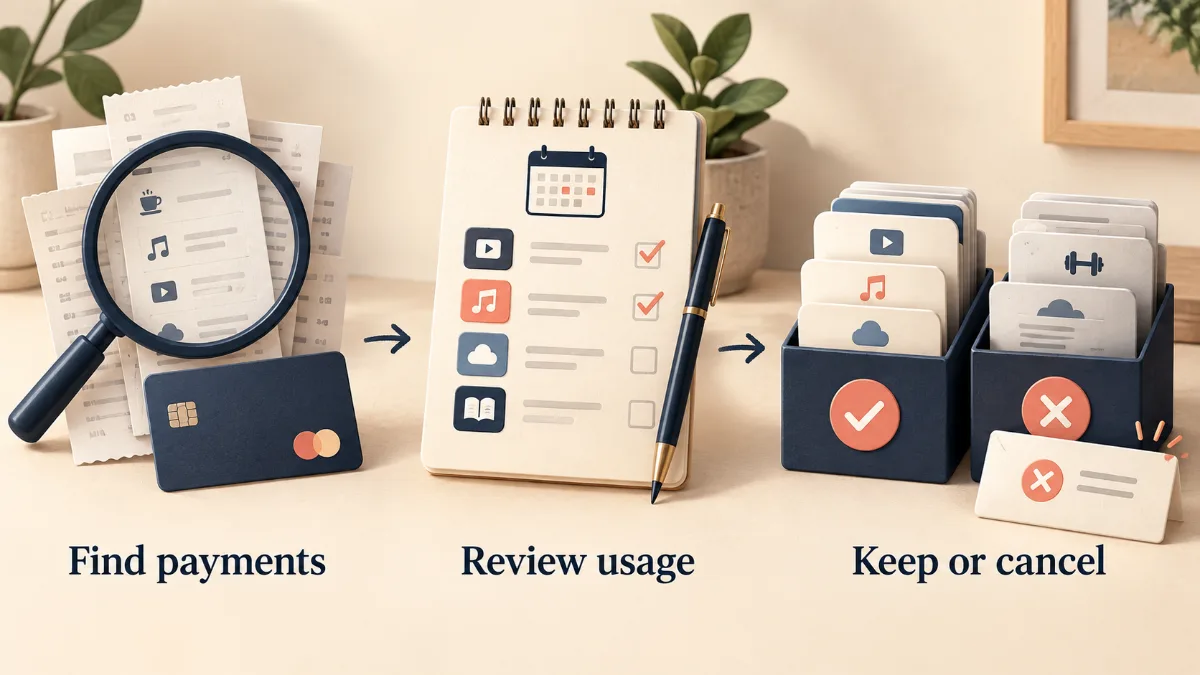
- Keep: a service with a clear purpose and regular use.
- Downgrade: a useful product with unused capacity or seats.
- Rotate: seasonal entertainment or occasional project tools.
- Cancel: a confirmed unused or duplicate subscription.
- Investigate: an unclear charge, owner or contractual obligation.
Use our subscription savings guide to compare bundles and overlap. Check student discounts only when eligibility applies.
Cancel safely and keep evidence
- Download important files and check that the copies open.
- Notify people who depend on shared access.
- Read any remaining commitment, refund terms and access end date.
- Cancel through the correct billing provider.
- Save the confirmation and expected final charge.
- Check subsequent statements for unexpected billing.
Be especially careful with storage, password managers and business software. Online-only files or access inside an app may not be an independent backup.
Investigate unfamiliar or continuing charges
A merchant descriptor can differ from the product name. Compare the exact amount and date with receipts and ask authorized users. If you suspect an unauthorized payment, contact your payment provider promptly through its official support route; follow its applicable dispute deadlines.
For a charge after cancellation, collect the confirmation, effective date and receipt. Contact the merchant or billing provider with that evidence. A payment dispute and cancelling an ongoing subscription are separate matters.
Keep the list current
Add new subscriptions when you start them. Review new charges and trials monthly, and schedule a fuller review a couple of times a year. Set annual renewal reminders early enough to compare alternatives and migrate data if necessary.
Use a tool you can maintain. A small accurate list is more useful than a complicated tracker you stop updating.
Frequently asked questions
Can I find everything in my phone settings?
No. Phone settings mainly show subscriptions billed through that account or store. Check statements and direct provider accounts too.
Does deleting an app stop payment?
No. Complete cancellation through the billing provider and verify the resulting status.
Will replacing a card cancel my subscriptions?
Do not rely on it. Manage each subscription with its provider and verify cancellation rather than assuming a card change ends the agreement.
Do I need a subscription tracker app?
Not necessarily. A spreadsheet or a note with each service, price, billing route and renewal date covers most households. Some banking apps also flag recurring payments. If you try a tracker app that connects to your bank, check what account data it can see and how you remove that access later.
How do I know the audit is complete?
Every recurring charge you identify should have an owner, billing route, renewal date and decision. Keep unresolved items visible until you can explain them.
Sources and price checks
Editorial check: 27 September 2026. Prices and terms are a dated snapshot, not a promise of a future offer. Confirm your country, selected plan, taxes and renewal at checkout.
Save Money Today
Compare current offers for this service
SubShave compares third-party offers for streaming, AI tools, and software. Check the seller’s current prices and terms before purchasing.
Related Articles
Other
Compare annual and monthly subscriptions using break-even calculations, renewal prices and cancellation terms to choose the right billing option.

Students can cut subscription costs by half or more across music, streaming, and software - and get a surprising amount completely free. Here is every major student discount worth claiming in 2026 and how verification actually works.
Learn how to save money on subscriptions in 2026, including streaming, software, AI tools, VPNs, music, TV services, and digital subscriptions.
Popular on SubShave
Save Money Today
Pay Less for the Subscriptions You Keep
Compare subscription offers for streaming, AI tools, and software. Prices, access arrangements, and availability vary by seller.
Explore All Deals