
Bolt.new Pricing in 2026: Free vs Pro, Plans, and Token Costs
 SubShave Editorial23 July 2026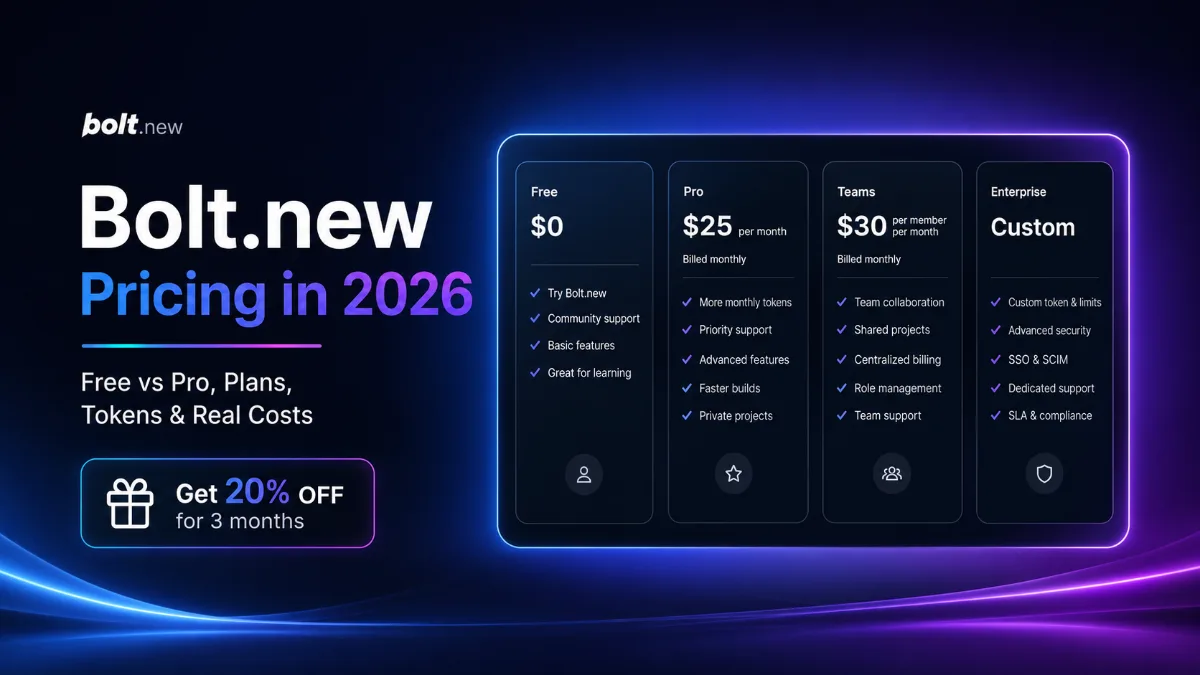
Compare Bolt.new pricing, Free vs Pro, monthly tokens, hosting, Teams, annual savings, and a referral offer that may give eligible readers 20% off.
Affiliate disclosure: This article contains affiliate links. SubShave may earn a commission if you purchase through them. SubShave publishes comparisons; the provider or seller identified at checkout handles your purchase.
Bolt.new pricing starts with a capable free plan and moves to Pro when daily token limits, platform branding, private sharing, custom domains or production hosting become important. Bolt also offers Teams and Enterprise options for organizations that need shared workspaces, centralized billing and stronger administration.
The subscription price is only one part of the total cost. Token usage, team members, hosting traffic, databases, domains and third-party services can all affect what you ultimately spend.
Save 20% on Bolt for three months
Eligible new users can use SubShave’s referral link to receive 20% off for three months. The discount should appear during checkout when eligibility requirements are met.
Bolt.new pricing: the direct answer
Bolt Free costs $0 and includes 1 million tokens per month, with a daily limit of 300,000 tokens.
Bolt Pro starts at $25 per month when billed monthly. It begins with 10 million monthly tokens, removes the daily token limit and adds features such as private sharing, custom domains, larger file uploads, removal of Bolt branding and increased hosting capacity.
Bolt Teams starts at $30 per paid member per month. Enterprise pricing is customized according to the organization’s security, support, procurement and usage requirements.
| Plan | Starting price | Included tokens | Best for |
|---|---|---|---|
| Free | $0 | 1 million per month with a 300,000 daily limit | Learning, testing and small projects |
| Pro | From $25 per month | From 10 million per month with no daily limit | Regular individual development and production projects |
| Teams | From $30 per paid member per month | Individual allocation for each paid member | Teams needing shared projects, billing and administration |
| Enterprise | Custom | Custom | Large organizations with security, support and compliance needs |
Prices and limits were reviewed in September 2026. Bolt advertises yearly savings of up to 28%, but the exact discount can depend on the selected plan and token package. Verify the live total on the official Bolt pricing page before paying.
Bolt.new plans explained
Bolt Free
Bolt Free is a practical starting point for learning the platform and testing whether it can support the type of website or application you want to build.
The plan includes public and private projects, website hosting, unlimited databases and 1 million tokens per month. However, the 300,000-token daily limit can interrupt a concentrated development session even when monthly tokens remain available.
Free projects retain Bolt branding and have smaller file-upload and hosting allowances. The plan is best used to test the complete workflow:
- Describe and generate a representative project.
- Install the packages or integrations you expect to use.
- Connect a database where relevant.
- Test previews and revisions.
- Publish a small version of the application.
- Review how quickly the daily token allowance is consumed.
Do not upgrade merely because the first project uses many tokens. Early experimentation can be inefficient. Upgrade when the limit repeatedly interrupts real work or when a paid feature becomes necessary.
Bolt Pro
Bolt Pro starts at $25 per month and is the main paid option for individual builders.
It starts with 10 million monthly tokens and removes the Free plan’s daily token limit. Pro also removes Bolt branding from published websites and adds private sharing, larger file uploads, custom domains, increased hosting capacity, SEO tools and expanded database options.
Pro is most useful when:
- You regularly reach the Free daily token limit.
- You are building projects for clients or customers.
- You need to remove Bolt branding.
- You need a custom domain.
- You want to share an unpublished project privately.
- Your published application requires more hosting traffic.
- You need larger uploads or expanded database capacity.
The cheapest Pro package will not fit every project. Bolt offers higher token allocations, so compare your actual monthly usage before selecting a larger package.
Bolt Teams
Bolt Teams starts at $30 per paid member per month. Each paid team member receives an individual monthly token allocation; tokens are not pooled or shared between team members.
Teams adds centralized billing, shared workspaces, access controls, administrative tools, organizational sharing and support for workflows such as private package registries and reusable team guidance.
Multiply the price by the number of active builders rather than the total number of people who may occasionally view a project. A reviewer who does not need to send prompts may not require the same paid access as a developer actively building inside Bolt.
Bolt Enterprise
Enterprise uses customized pricing. It is designed for organizations that need requirements such as single sign-on, audit logs, compliance support, data-governance controls, customized workflows, service-level agreements and priority support.
Enterprise should be evaluated through the organization’s technical, legal, security and procurement requirements rather than through a simple cost-per-token comparison.
Bolt.new Free vs Pro
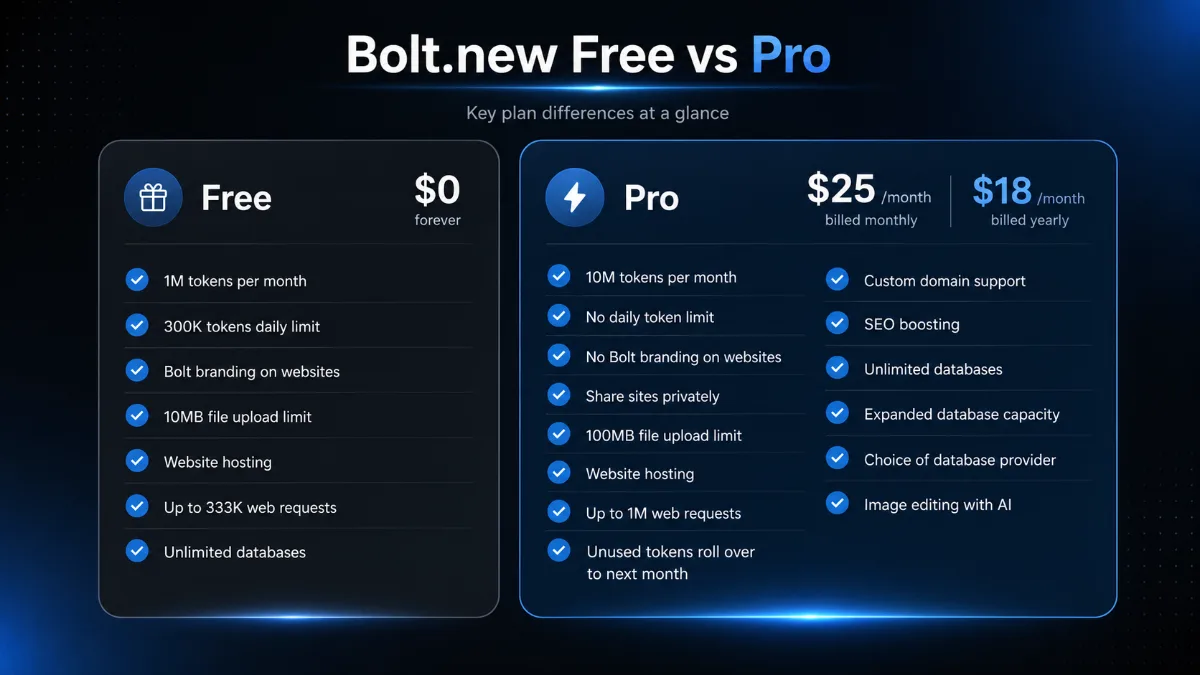
The main difference in a Bolt.new Free vs Pro comparison is not simply the number of tokens. Pro removes several restrictions that can matter when a project moves from experimentation to real use.
| Feature | Free | Pro |
|---|---|---|
| Monthly tokens | 1 million | Starts at 10 million |
| Daily token limit | 300,000 | No daily limit |
| Private projects | Included | Included |
| Private site sharing | Limited | Included |
| Bolt branding | Displayed on published websites | Can be removed |
| Custom domains | Not included | Included |
| File upload limit | 10 MB | 100 MB |
| Hosting requests | Up to approximately 333,000 per month | Up to 1 million per month before additional capacity |
| Token rollover | No | Eligible unused tokens roll over for one additional month |
Choose Free while you are proving the workflow. Choose Pro when a documented Free-plan limitation prevents you from completing, presenting or publishing the project properly.
How Bolt.new tokens work
Tokens are the units the AI uses when reading your instructions, examining project files, generating code and responding to requests.
Larger projects generally use more tokens because Bolt must read and synchronize more files with every message. A short request inside a mature application can therefore use more tokens than a longer request inside a new and nearly empty project.
Token consumption depends on factors such as:
- The size of the project.
- The amount of context included in the conversation.
- The number and size of files Bolt must inspect.
- The complexity of the requested change.
- The number of revisions or failed attempts.
- Whether the instruction requires broad changes across the codebase.
Free tokens reset on the first day of each calendar month. Paid-plan tokens reset on the subscription renewal date.
Unused tokens from an active paid subscription can roll over for one additional month, making them valid for up to two months in total. Free-plan tokens do not roll over. Bolt explains the current rules in its token documentation.
How to calculate the real Bolt.new cost
The advertised Bolt.new price covers the subscription and its included allowance, but a complete project can involve other expenses.
- Token package: Larger or more active projects may require more than the entry Pro allocation.
- Team members: Teams is priced per paid member.
- Hosting traffic: Higher traffic can exceed the included bandwidth or request allowance.
- Custom domain: The domain itself is normally purchased separately.
- Database services: External databases or higher usage can have separate costs.
- Third-party APIs: Payment, email, artificial intelligence, mapping and other APIs may charge independently.
- Monitoring and analytics: External production tools can add recurring expenses.
Track the tokens used by one representative build session and estimate how many similar sessions you expect each month. Include retries, debugging and revisions rather than counting only successful prompts.
A $25 subscription that completes the project can be less expensive than a free plan that repeatedly interrupts development. Conversely, a high-token plan is poor value when most of its allowance expires unused.
Ready to try Bolt Pro?
Eligible readers can receive 20% off for three months through SubShave’s referral link. Check that the discount appears before completing payment.
Bolt.new discount: get 20% off for three months
SubShave’s Bolt referral link currently offers eligible readers 20% off for three months.
The offer uses a referral link rather than a Bolt new promo code that you manually type into a coupon field. Open the link, continue to Bolt and confirm that the discount is shown during checkout.
- The offer is presented as 20% off for three months.
- Eligibility requirements may apply.
- The discount should be shown during checkout.
- The normal plan price can apply after the promotional period.
- The selected token package and billing frequency still affect the final total.
Claim the Bolt.new discount
Open the SubShave referral page to start building and check your eligibility for 20% off during the first three months.
Monthly versus annual Bolt billing
Monthly billing provides greater flexibility. It is the safer option while you are testing Bolt, estimating token usage or building a short-term project.
Yearly billing can reduce the effective monthly cost, and Bolt’s pricing page advertises savings of up to 28%. The exact reduction may vary according to the selected plan or token allowance.
Choose annual billing when:
- You have already used Bolt consistently for several months.
- You understand your typical token consumption.
- You expect the project or development workflow to continue for the year.
- The upfront payment fits your budget.
- The annual checkout provides a meaningful saving.
Choose monthly billing when:
- You are still testing the platform.
- Your project is temporary.
- Your token needs are uncertain.
- The product is one of several development tools being compared.
- Flexibility matters more than the annual discount.
Bolt hosting and additional usage costs
Bolt provides built-in hosting to Free and paid users. Free users can publish to a Bolt-hosted address, while custom domains are available on paid plans.
The Free hosting allowance supports up to approximately 333,000 requests per month. Pro increases that to approximately 1 million requests and provides a route to additional capacity.
Actual visitor capacity depends on the application. Image-heavy pages, large files, frequent API requests and database activity can consume more bandwidth or resources than a simple static website.
Before launching a production application, estimate:
- Expected monthly visitors.
- Average page and image size.
- Database usage.
- External API calls.
- File storage and uploads.
- Email, authentication and payment costs.
- What happens when a usage limit is reached.
Can you cancel Bolt Pro?
Bolt says paid subscriptions can be cancelled at any time. Cancelling a paid subscription works as a downgrade to the Free plan.
When cancellation is completed during a billing period, the paid plan normally remains active until the end of that period. Unused tokens remain available while the paid subscription is active.
At the end of the billing period, the account returns to Free limits. When more than the Free monthly allowance has already been consumed, further building may be unavailable until the next Free token reset.
Before cancelling:
- Commit current work to version control.
- Export important project files.
- Check custom-domain and hosting requirements.
- Review database and third-party service connections.
- Record when the paid period ends.
- Check whether rolled-over tokens will remain accessible.
Is Bolt.new Pro worth it?
Bolt Pro is worth considering when you regularly use Bolt to build real applications and the Free plan’s limits interrupt development or prevent professional delivery.
Pro is easier to justify when custom domains, removal of Bolt branding, private sharing, higher uploads or increased hosting directly support a client, business or production project.
It may not be worth paying for Pro when you are still experimenting, use Bolt only occasionally or have no immediate need for the paid publishing and hosting features.
Use Free to establish the workflow first. Keep Pro only when you can identify the specific limitation or paid feature that makes the subscription worthwhile.
Bolt.new alternatives
Bolt competes with AI coding assistants, browser development environments, no-code application builders and traditional local-development workflows.
Compare alternatives using:
- Supported languages and frameworks.
- Code ownership and export.
- Git and repository integration.
- Database support.
- Deployment and hosting.
- Debugging and manual code editing.
- Collaboration and team administration.
- Token, credit or usage pricing.
- Ability to move the project elsewhere.
For a broader decision framework, review current subscription and software deals before adding another recurring payment.
Bolt.new checklist before subscribing
- Confirm whether Free already supports the project.
- Track token usage during a representative build session.
- Choose the smallest paid token package that covers realistic use.
- Confirm monthly or annual billing.
- Check the amount charged today and the normal renewal price.
- Estimate hosting and database requirements.
- Include external APIs, domains and other services in the budget.
- Confirm how code and data will be exported.
- Check that the 20% referral discount appears during checkout.
- Set a reminder before the three-month discount period ends.
Frequently asked questions
How much does Bolt.new cost?
Bolt Free costs $0. Bolt Pro starts at $25 per month, Teams starts at $30 per paid member per month and Enterprise uses customized pricing.
Is Bolt.new free?
Yes. Bolt Free includes public and private projects, website hosting, 1 million tokens per month and a 300,000-token daily limit.
What does Bolt Pro include?
Bolt Pro starts with 10 million monthly tokens and no daily limit. It also removes Bolt branding and adds private sharing, custom domains, larger uploads, increased hosting, token rollover and expanded database options.
How do Bolt.new tokens work?
Tokens are consumed when Bolt reads instructions, examines project files and generates responses or code. Larger projects usually consume more tokens because more project context must be processed.
Do unused Bolt tokens roll over?
Unused paid subscription tokens can roll over for one additional month while an eligible paid subscription remains active. Free tokens do not roll over.
Is Bolt.new Pro worth it?
Pro is worthwhile when Free limits regularly interrupt work or when custom domains, unbranded publishing, private sharing, higher uploads or increased hosting are required.
Does Bolt have a promo code?
SubShave’s current offer uses a referral link rather than a manually entered promo code. Eligible readers may receive 20% off for three months, with the discount applied during checkout.
Can I cancel Bolt Pro?
Yes. Bolt allows paid subscriptions to be cancelled. The paid plan normally remains active until the end of the current billing period before the account returns to Free limits.
Does Bolt include hosting?
Yes. Free and paid Bolt plans include hosting. Pro provides higher capacity and supports custom domains.
Bottom line on Bolt.new pricing
Bolt.new pricing begins with a useful Free plan, while Pro starts at $25 per month with 10 million monthly tokens, no daily token limit and stronger publishing and hosting features.
Use Free while testing the platform. Upgrade to Pro when a documented limit or paid feature affects a real project. Teams is intended for active collaborators, while Enterprise is for organizations requiring negotiated security, support and governance.
Eligible readers can currently use SubShave’s referral link to receive 20% off for three months. Confirm that the discount appears during checkout and record the normal price that will apply after the promotional period.
Start building with Bolt
Use SubShave’s referral invitation and check whether you qualify for 20% off during your first three months.
Related guides to help you choose
- AI subscriptions compared by task — Choose an AI tool around the work you do.
- Manus Pro pricing and credits — Budget for agent tasks and credit allowances.
- software subscription deals — Compare the tools you need for work and creative projects.
Sources and offer checks
Editorial review: 26 September 2026. The links below support the specific plan, price or access points discussed. Prices, eligibility and availability can change; confirm the selected checkout before buying.
Save Money Today
Compare current offers for this service
SubShave compares third-party offers for streaming, AI tools, and software. Check the seller’s current prices and terms before purchasing.
Related Articles
AI Tools
Find AI study tools for explanations, lecture notes, quizzes and revision. Compare free options, student eligibility and ways to check AI answers.

Compare ElevenLabs plans, monthly credits and annual costs. Understand rollover, commercial use and the real cost of retries before choosing a plan.

Compare Runway AI Free, Standard, Pro and Max pricing, annual costs and credits. Learn how retries, rollover and API billing affect your budget.
Popular on SubShave
Save Money Today
Pay Less for the Subscriptions You Keep
Compare subscription offers for streaming, AI tools, and software. Prices, access arrangements, and availability vary by seller.
Explore All Deals