
How to Cancel Paramount Plus: Web, iPhone, Android, Roku and Amazon (2026)
 SubShave Editorial1 November 2026
Cancel Paramount+ where you are billed: website, Apple, Google Play, Roku, Amazon or a partner. What happens after, refunds, and what to check if you are charged again.
To cancel Paramount Plus, cancel it with the company that bills you. If you pay Paramount+ directly, sign in at paramountplus.com, open your Account page and choose to cancel. If you subscribed through an iPhone, Google Play, Roku, Amazon or a phone or TV provider, cancel through that company instead. Deleting the app does not stop the payments.
After you cancel, you keep watching until the end of the period you have already paid for, and Paramount's terms say paid fees are not refunded. We checked the Paramount+ terms of use (dated 15 September 2026) and the billing partners' help pages on 24 October 2026.
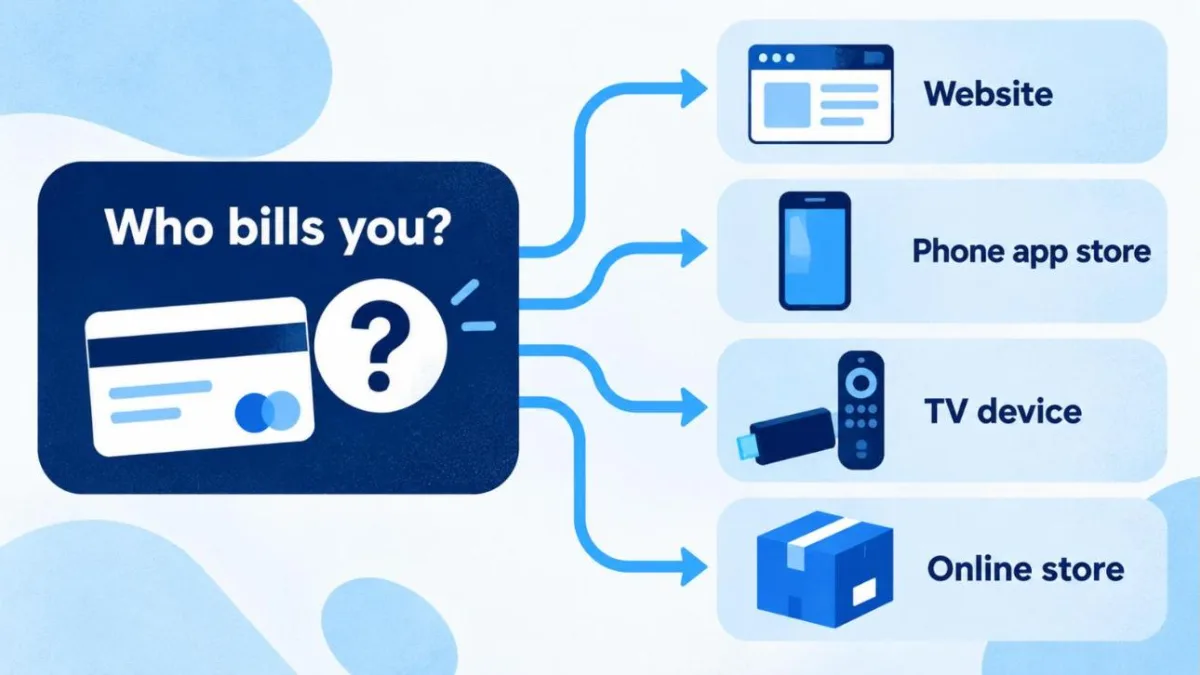
First, find out who bills you
This is the step most people skip, and it is why "I cancelled but was charged again" happens. Look at the last charge on your bank or card statement:
- "Paramount+" or "Paramount Plus": you pay Paramount directly. Cancel on the website.
- "Apple.com/bill": Apple bills you. Cancel in your Apple subscriptions.
- "Google Play" or "Google *Paramount": Google bills you. Cancel in Google Play.
- "Roku" or "Amazon": cancel in that account.
- No separate charge: Paramount+ may be included with another service, such as a phone plan, TV package or membership. Manage it with that company.
If you cannot tell, search your email for the original welcome or receipt email. It names the billing company.
How to cancel Paramount Plus on each platform
| Billed by | Where to cancel | Steps |
|---|---|---|
| Paramount+ (direct) | paramountplus.com/account in a web browser | Sign in, open Account, choose to cancel your subscription and follow the prompts until you see a confirmation. |
| Apple (iPhone, iPad, Apple TV) | Settings app | Settings, then your name, then Subscriptions, then Paramount+, then Cancel Subscription. |
| Google Play (Android) | Google Play app or play.google.com | Open your subscriptions in Google Play, select Paramount+, tap Cancel subscription and follow the instructions. |
| Roku | my.roku.com/subscriptions, or on the Roku device | Select Paramount+ on the subscriptions page, or highlight the app on your Roku and press the Star button on the remote to manage the subscription. |
| Amazon | Your Amazon account | Open your memberships and subscriptions settings, find Paramount+ (a Prime Video channel or an Appstore subscription) and cancel it there. |
| Phone, TV or membership partner | That company's account or support | Remove Paramount+ from your plan or add-ons. Paramount cannot cancel it for you. |
Whichever route applies, keep the confirmation email or take a screenshot of the confirmation screen. It is your proof if a charge appears later.
What happens after you cancel
For subscriptions billed directly, Paramount's terms set out three rules:
- You keep access until the paid period ends. Cancellation takes effect at the end of your current billing period, or at the end of a free trial if you are still on one.
- No refund for the rest of the period. The terms state that fees already paid are not refunded, apart from situations where the law gives you a right to one.
- Add-ons can end with it. If you cancel a subscription that has add-ons, access to the add-on may end when the main subscription expires.
Subscriptions billed by Apple, Google, Roku or Amazon follow that company's rules, and refund requests for those charges go to that company, not to Paramount. Google, for example, says past subscription payments cannot be refunded apart from the exceptions in its refund policy.
When to cancel so you lose nothing
Because access continues until the paid period ends, there is no reason to wait until the last day. Cancel as soon as you decide, and you still get every day you paid for.
Example: your Premium plan renews on the 12th of each month at $13.99. You cancel on the 20th. You can keep watching until the 11th of the next month, and no further charge is taken. If you had waited until the 11th to cancel, you would have gained nothing and risked forgetting.
Yearly plans work the same way. If you paid $139.99 for a year of Premium in March and cancel in June, the subscription stops at the next renewal date in March. You do not get the unused months back, so the useful thing cancelling does is stop the renewal.
Free trials: if you cancel during a trial, the trial still runs to its end. For trials started through Apple, Apple advises cancelling at least 24 hours before the trial ends so you are not charged.
Thinking of cancelling? Two cheaper alternatives
Drop to Essential. If ads are the only thing keeping you on Premium, switching from Premium ($13.99) to Essential ($8.99) saves $5 a month, or $60 a year. You lose ad-free on-demand viewing, downloads, the full Showtime catalogue and some live CBS coverage, so check that the shows and sports you watch are included in Essential. Our Paramount Plus price guide compares the two plans line by line.
Subscribe only for the season you watch. Many people keep Paramount+ for one sport or one series. Four months of Premium at $13.99 is $55.96, well under the $139.99 yearly price. Cancel when the season ends and come back later. Our guide to monthly vs yearly subscriptions shows when paying for a full year makes sense.
Charged after cancelling? What to check
- Two subscriptions. It is common to have one through Apple or Google and another on the website, especially after a free trial on a new device. Check every billing route from the list above.
- A different account. Check that the email address you cancelled under is the one on the charge.
- The renewal came first. If you cancelled on or just after your renewal date, that renewal may already have been charged. Compare the date on your confirmation with the date of the charge.
- A bundle you forgot about. A phone plan, TV package or membership may include Paramount+ and keep it active.
If none of these explains it, contact the company that billed you with your cancellation confirmation. Doing a full subscription check once a year helps you catch subscriptions like this before they renew.
Questions about cancelling Paramount Plus
Can I cancel Paramount Plus at any time?
Yes. You can cancel whenever you like, and access continues until the end of the period you have paid for.
Do I get a refund if I cancel Paramount Plus?
Usually not. Paramount's terms say fees you have paid are not refunded, except where the law gives you a right to a refund. For charges from Apple, Google, Roku or Amazon, any refund request goes to that company.
Why can't I see a cancel option on the Paramount+ website?
That normally means someone else bills you, such as Apple, Google Play, Roku, Amazon or a phone or TV provider. Cancel with that company instead.
Does deleting the Paramount+ app cancel my subscription?
No. Deleting the app or signing out does not stop billing. You need to cancel with the company that charges you.
Will I lose my profiles and watch history?
Cancelling a subscription is not the same as deleting your account. If you come back later, sign in with the same email. Deleting the account is a separate step and removes your profiles and viewing preferences permanently.
Is Paramount Plus worth keeping?
It depends on how often you watch. If you only use it for one sport or show, subscribing month by month during that season is usually cheaper than keeping it all year. Our list of streaming deals helps you compare it with the other services you pay for.
Paramount+ cancellation sources
Checked on 24 October 2026. Billing menus can change, so follow the on-screen steps if they differ slightly.
Save Money Today
Compare current offers for this service
SubShave compares third-party offers for streaming, AI tools, and software. Check the seller’s current prices and terms before purchasing.
Related Articles
Streaming
Black Friday 2026 is on 27 November. See last year's streaming offers, what they renewed at, and five checks before you sign up for a deal.

Compare Crunchyroll US prices, Fan vs Mega Fan, offline viewing and annual billing. Check which plan fits your viewing habits before you subscribe.

Compare the best streaming deals through rotation, annual plans, bundles, trials, prepaid membership and clearly labelled shared access.
Popular on SubShave
Save Money Today
Pay Less for the Subscriptions You Keep
Compare subscription offers for streaming, AI tools, and software. Prices, access arrangements, and availability vary by seller.
Explore All Deals